
Gallop Technology Group: Adding ACH Payment to Billing

NOTE:

What’s changing:

Paying by Credit Card

Your Call to Action

Paying by other methods

ACH as Default Payment Method

  • Switching to ACH as our preferred payment method adds an additional level of security by leveraging encrypted bank-to-bank transactions to help protect against criminal or fraudulent activity.
    Gallop Technology Group adheres to the PCI DSS standard, which is the security standard governing the payment card industry, and we apply the same strict measures to processing ACH as we do to credit cards.
  • If you have any questions, please reach out! We’re happy to explain further as needed!

In order to add ACH (Automated Clearing House) payment method to our billing portal, Please follow these steps:

1. Log in to our billing portal (Link is on https://www.galloptechgroup.com/billing-portal.

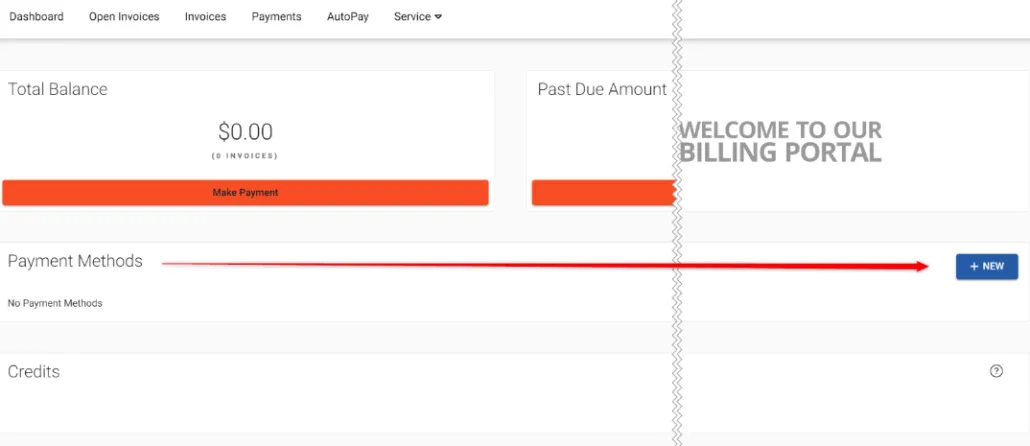
2. After logging in to the portal from the main login Dashboard, click on “NEW” on the “Payment Methods” section.

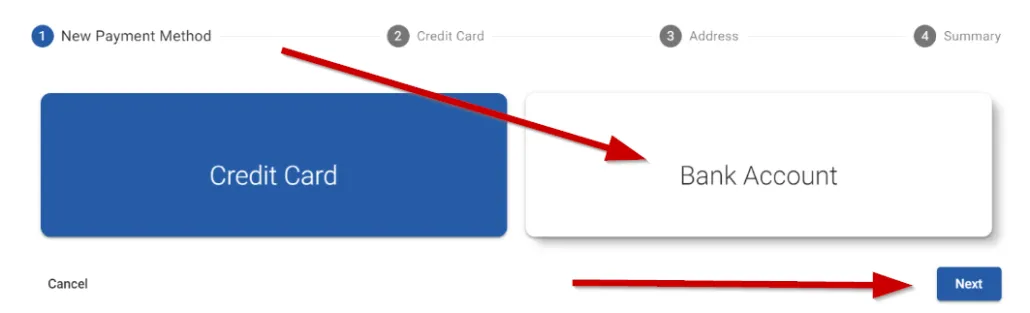
3. Select “Bank Account” and click on “Next”

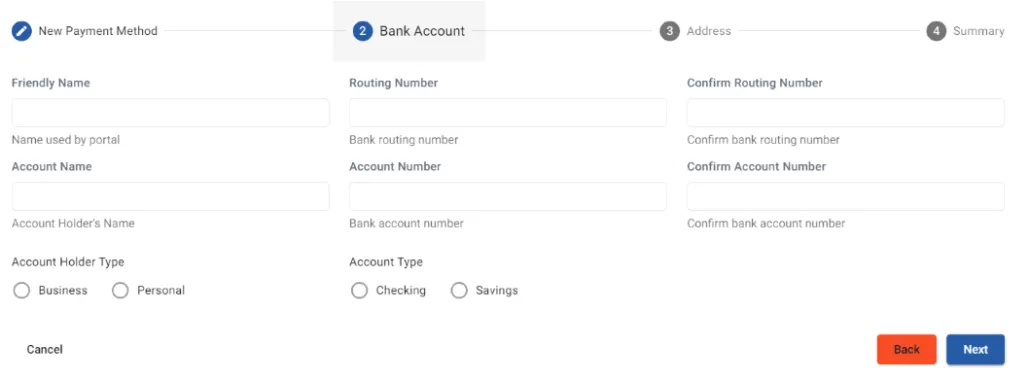
4. Complete the required fields and on the last screen check the authorization checkbox and select “Submit”